What is a QBR? A practical guide to the quarterly business review
A QBR (quarterly business review) is a meeting held once a quarter where a team, or a vendor and its customer, reviews the last 90 days against the plan: the numbers, what shipped, what slipped, and what happens next quarter. It is usually run from a short deck of 8 to 12 slides and should end with a decision or an ask.
I have sat on both sides of these. The good ones are short, honest, and decide something. The bad ones are a wall of charts nobody remembers by lunch. This guide covers everything you need to run a good one: what QBR means in business and in sales, a 60-minute agenda, the deck slide by slide, which metrics to show for your function, a prep checklist, and the mistakes that sink most reviews.
#What does QBR stand for?
QBR stands for quarterly business review. Teams also call it a business review, an account review, or just "the quarterly". The quarterly cadence is the point: often enough to change course, slow enough that real trends show up in the data. A weekly check-in cannot see a trend, and an annual review sees it far too late.
The term covers two different meetings, and most confusion about "QBR meaning" comes from mixing them up:
- Internal QBR. A team or business unit reviews its own performance with leadership: results against targets, what worked, what did not, and next quarter's plan and budget.
- Customer QBR. A customer success manager or account executive reviews an account with the client: value delivered, adoption, open issues, the roadmap that affects them, and the path to renewal or expansion.
Same skeleton, different lens. An internal QBR is judged on your KPIs. A customer QBR is judged on the outcomes the customer bought you for.
#What is a QBR in sales?
In sales, a QBR means one of two things. The first is the internal sales QBR, where each rep or team walks leadership through the quarter's bookings against quota, pipeline coverage for next quarter, win rate, and the deals at risk. The second is the customer-facing QBR an account executive runs with a key account to prove value and set up the renewal or upsell.
For a sales QBR with leadership, the question in the room is simple: will we hit next quarter, and what do you need to get there? Lead with attainment and pipeline coverage, then the top five deals by size with their real stage and next step. Skip the activity counts (calls made, emails sent) unless they explain a miss.
For a customer QBR, the mistake I see most often is treating it as a product demo. The customer already bought. What earns the renewal is proof the product is working on their numbers and an honest plan for the parts that are not. Lead with their outcomes, not your features.
#Who attends a QBR?
Invite the people who can act on the ask. For an internal QBR that is the team lead, their manager or the executive owner, and usually a partner from finance plus anyone whose roadmap you depend on. For a customer QBR it is your account team (CSM, account executive, sometimes a solutions engineer or your executive sponsor) and, on their side, the executive sponsor plus one or two day-to-day users.
A QBR with no decision-maker present is a status update. If the one person who can approve the budget or sign the renewal cannot attend, move the date.
#What is a good QBR agenda?
A 60-minute QBR works well with six blocks. The timings below assume a deck of about ten slides and leave roughly half the meeting for discussion, which is the part that produces decisions.
| Time | Block | What happens |
|---|---|---|
| 0 to 5 min | Context and goals | Recap the goals you agreed last quarter, and state what you want from this meeting |
| 5 to 15 min | Results vs plan | The three or four headline metrics, against target, with the trend |
| 15 to 25 min | Wins and what drove them | Two or three outcomes, each tied to a metric |
| 25 to 35 min | Risks and misses | What slipped, why, and the fix already in motion |
| 35 to 50 min | Next quarter | Priorities, targets, dependencies; the ask in detail |
| 50 to 60 min | Decisions and owners | Confirm what was decided, who owns each action, and the date to check in |
For a customer QBR, swap "results vs plan" for "value delivered against the success plan", and add a short roadmap preview in the next-quarter block. For a 30-minute version, cut the wins section to one slide and keep the risks and the ask intact. Those two blocks are why the meeting exists.
#What goes in a QBR deck, slide by slide?
A QBR deck is not a status report with more slides. It is a small set of slides, each answering a question the room is already asking.
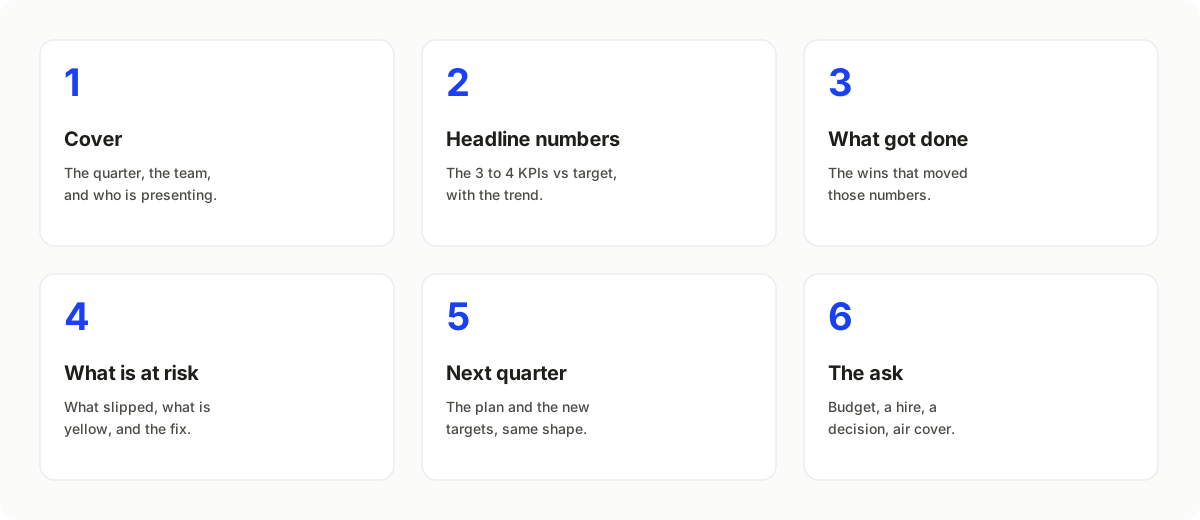
The spine most QBR decks share. Yours might drop a section or add an account-health slide, but start here.
Here is the full deck I would build for a typical internal or customer QBR:
- Cover. The quarter, the team or account, who is presenting.
- Executive summary. The quarter in three lines: the headline result, the biggest risk, the ask. Anyone who reads only this slide should know how the quarter went. (If you struggle with this one, my guide on how to write an executive summary covers the structure.)
- Goals recap. What you committed to last quarter, copied verbatim, so nobody can move the goalposts.
- Scorecard. Three or four KPIs, actual vs target, with a green/amber/red status.
- Trend chart. One chart that explains the headline number, such as revenue by month or adoption over the quarter.
- Wins. Two or three, each linked to a metric on the scorecard.
- Risks and misses. What slipped, the root cause, the fix, and the owner.
- Account health or pipeline. For a customer QBR: usage, support tickets, stakeholder changes, renewal date. For a sales QBR: pipeline coverage and top deals.
- Next quarter plan. Priorities and targets, drawn in the same shape as the scorecard so next quarter's comparison is obvious.
- The ask. One thing you need: budget, a hire, a decision, an introduction, a signed renewal.
- Appendix. Detailed tables for anyone who wants them. Never present from the appendix.
Here is that structure as a live QBR deck on a sample brand. Click through it:

It is the quarterly business review template, so you can start from the same structure and swap in your own numbers.
#Which QBR metrics should you include?
Show three or four metrics that decide the quarter, not every number you track. The right ones depend on who is presenting. These are the ones I see work by function:
| Function | Headline QBR metrics | Supporting detail |
|---|---|---|
| Sales | Bookings vs quota, pipeline coverage for next quarter, win rate | Average deal size, sales cycle length, top deals at risk |
| Customer success | Gross and net revenue retention, renewals closed, product adoption | Health scores by account, support ticket volume, expansion pipeline |
| Customer QBR (account view) | The outcomes in their success plan (time saved, cost reduced, revenue influenced), active users | Feature adoption, open tickets, upcoming renewal date |
| Marketing | Pipeline sourced, cost per opportunity, conversion by stage | Channel mix, campaign results, content performance |
| Finance | Revenue vs budget, gross margin, burn and runway | Spend by department, forecast changes |
| Product and engineering | Roadmap delivered vs committed, adoption of new features, reliability | Incidents, cycle time, top customer requests |
Two rules keep the metrics honest. Always show the target next to the actual, because a number without a target is trivia. And keep the same metrics quarter to quarter, so the room can compare instead of re-learning the dashboard every time.
#How do you prepare for a QBR?
Good QBRs are mostly won before the meeting. The deck takes an hour or two; the preparation is where the work is. The checklist I use, counted back from the meeting date:
Two weeks before
- Confirm the date with the decision-maker and the executive sponsor.
- Pull last quarter's QBR deck and the goals you committed to.
One week before
- Pull the real numbers from your CRM, billing, or product analytics, so a surprise in the data is not a surprise in the room.
- Write one sentence per metric: the line you want people to repeat afterward. If you cannot write it, the chart is not ready.
- Decide the ask. One ask. A QBR with five asks has none.
Three to five days before
- Build the deck and send the executive summary slide to your sponsor for a sanity check.
- Walk key stakeholders through the bad news privately. Nobody should hear about a missed target for the first time in the QBR.
- For a customer QBR, send the agenda and ask the customer what they want covered.
The day before
- Rehearse once and cut every slide you skipped past.
- Send the pre-read if your audience likes one.
After the meeting
- Send the deck (or PDF) plus a short note with decisions, owners, and dates within 24 hours. This is your QBR report, and next quarter's goals recap slide starts from it.
#What are the most common QBR mistakes?
Most QBRs fail in predictable ways:
- Reporting activity instead of outcomes. "We ran 14 campaigns" is not a result. "Campaigns sourced $1.2M of pipeline against a $1M target" is.
- Hiding the misses. Leaving the bad news out does not make it disappear; it makes the audience distrust every green slide.
- Too many metrics. Thirty numbers means nobody remembers any of them. Three or four, with targets.
- No ask, or too many. The meeting should end with a decision. Name it on its own slide.
- Presenting the whole meeting. If you talk for 55 of 60 minutes, nothing gets decided. Leave half the time for discussion.
- A product demo disguised as a customer QBR. Lead with their results. Show the roadmap only where it touches their goals.
- Rebuilding the deck from scratch every quarter. Use a fixed template so the comparison is quarter over quarter, not format over format.
#How is a QBR different from a monthly or weekly review?
Mostly altitude and audience. A weekly sync is about tasks, a monthly review is about metrics and blockers, and a QBR is about strategy: targets, trade-offs, and the ask.
| Dimension | Weekly sync | Monthly review | QBR |
|---|---|---|---|
| Horizon | Last 7 days | Last 30 days | Last 90 days, plus next quarter |
| Audience | The team | Team and manager | Leadership, the board, or key accounts |
| Altitude | Tasks and blockers | Metrics and progress | Strategy, targets, the ask |
| Output | Notes | A short written update | A deck people keep and compare next quarter |
If your QBR reads like a longer monthly review, raise the altitude: cut task-level detail and make every slide ladder up to a decision. For a board audience the altitude goes up again; see the board deck generator and the board update template for that format.
#Do you need QBR software or a QBR dashboard?
Not necessarily. A QBR dashboard (in your CRM, BI tool, or customer success platform) is where the numbers live and update. The QBR deck is the curated story you present from those numbers once a quarter. You need both: the dashboard to keep the data current, the deck to say what it means and what you want.
Where dedicated QBR software helps is at scale. A customer success team running forty account QBRs a quarter cannot hand-build forty decks. That is the job an AI QBR deck generator does: take each account's numbers and produce a consistent, branded deck, which the CSM then edits and presents.
#How do you build a QBR deck with AI?
The slow way is to export the numbers, paste them into slides, fix the formatting by hand, and lose an afternoon per account. The faster way is to give an AI agent the numbers and the story and let it assemble the deck.
That is the job I built heydecks for. Connect its MCP server to Claude, ChatGPT, or Cursor, paste the quarter's metrics and a few lines of narrative, and the agent builds the QBR from hand-designed slide templates (scorecard, trend chart, status table, roadmap) on your brand. It does not invent your numbers or your strategy; you bring those, it builds the slides. A prompt as short as this works:
Build a QBR for Acme: usage up 22% this quarter, 3 open support risks, renewal in 60 days, expansion opportunity in their EU team. Include account health and next steps.
For the customer success team running forty account reviews a quarter, the deck API does the same thing in a loop: one call per account, each job returning a live deck link you can export to PDF, or to editable PowerPoint on paid plans.
curl -X POST https://heydecks.com/v1/generate \
  -H "Authorization: Bearer hd_live_..." \
  -H "Content-Type: application/json" \
  -d '{
    "input": "Q3 QBR for Northwind: 41,000 shipments (+22% QoQ), quote turnaround 4h to 50min, finance rollout blocked on data sign-off, renewal in January. Ask: joint call with IT by Oct 15.",
    "brand_id": "brand_abc"
  }'
If you want to see the prompt, the output, and the slide structure side by side, the QBR generator walks through a full example.
#Frequently asked questions
#What does QBR stand for in business?
QBR stands for quarterly business review: a meeting held every quarter to review results against the plan and agree on what happens next. In sales and customer success it often means the same review run with a customer, to show value delivered and set up the renewal.
#How long should a QBR be?
Most QBRs run 45 to 60 minutes, with a deck of 8 to 12 slides. Plan to present for about half the time and spend the rest on discussion and decisions.
#What is the difference between a QBR and an EBR?
An EBR, or executive business review, is a QBR aimed at executive sponsors: usually less frequent, higher altitude, and focused on strategic outcomes rather than operational detail. Many teams run quarterly QBRs with day-to-day contacts and an annual or semi-annual EBR on top.
#How often should you run a QBR?
Once a quarter is the default for internal teams and most customer accounts. High-touch enterprise accounts sometimes get monthly business reviews, while smaller accounts may only warrant a review twice a year.
#What is a QBR report?
A QBR report is the written record of the review: the deck or PDF plus a short summary of decisions, owners, and deadlines, sent within a day of the meeting. It becomes the starting point for next quarter's goals recap.
#Can I generate a QBR deck automatically?
Yes. An AI agent can build the deck from your metrics and a short narrative. heydecks does this over MCP or its API and returns a live deck, a PDF, and an editable PowerPoint on your brand; you still review the story before presenting.
Keep reading